Friday, February 27, 2015

Inspired by VentureLab in San Antonio

Here is post I just added to  my  Where the Girls Are series of posts from my TechSavvy Girls blog. 

As some of you know I love to be inspired by creative people and places.  Today's tour of VentureLab  was one of the highlights of our travels through San Antonio as part of our Living Learning Mobile Journey.   When I discovered VentureLab, one of the things that caught my attention right away was the 60% female participation statistic on the front page of their web site.

vwe're making a real difference

 724 students, 60% female participation,

Who are these people that are having such great results getting young women involved in high tech ventures?  I immediately started clicking around their website and discovered that not only are 60% of their student participants female,   but over 60% of their team are women -- SMART women!


And one of these women is their founder, Cristal Glangchai, PhD in BioMedical Engineering.   

Cristal is a scientist, professor,  entrepreneur , and mother of two girls who is passionate about teaching girls to become leaders in technology, innovation and entrepreneurship.

Spend two minutes with Cristal in this short video and you'll see for yourself  how the lack of women in her university program, lack of women CEOs, lack of women investors, all fueled Cristal's desire to get  more women involved in the innovation landscape.  And one of the ways she is doing that is through VentureLab  ~ an innovation academy that focuses on hands on learning and teaching youth about entrepreneurship.


But  it's not just Cristal's passion for raising the number of females who play a role in shaping the world around us that is driving the success you see at VentureLab;  it is the passion of a whole team and their belief in a shared vision. 

Click on the WHO ARE WE Link and listen to children, parents, community members, and other stakeholders join Cristal (cofounder)  and Director of Programs, Nick Honegger. passionately describe the shared vision of VentureLab.    As Dirk Elemdorf cofounder of Rackspace,  describes "this whole industry has been dominated by dudes who look exactly like me~ young white dudes."   VentureLab is filled with a team of supporters who are passionate in making changes in an industry that currently "cuts off women and people of color".  They understands that

"diversity of view gives us diversity of solution by keeping people not otherwise exposed to this stuff in the game we get a better shot of having them actually take these roles that we need to fill our future"


The shared mission of the team of VentureLab came through loud and clear as Program Director Director of Programs, Nick Honegger, described what happens at Venture Lab during our tour of the space today.


Start YOUNG! 

VentureLab wants to start with kids as young as 5 years old!


EVERY student should  EXPERIENCE ENTREPRENEURSHIP!

Using our ESTEAM framework, we provide experiential learning in Entrepreneurship,Science, Technology, Engineering, Arts, and Mathematics, teaching students the key mindsets of entrepreneurial thinking, design thinking, creativity, and we provide hands on instruction in technology.  [VentureLab Website]

Let's Utilize our FULL WORKFORCE! 
Getting more women to participate in the STEM fields and take on entrepreneurial roles is not just about achieving gender equality; our entire country will benefit from this progress and development. To realize our full competitive and technological leadership as a nation, young women must be encouraged to achieve their full potential and receive more representation within ESTEAM-related fields. We want to ensure that our full workforce is being utilized, and that is why we strive to achieve gender parity within all of our programs.  [VentureLab Website]


Thank you, Hetali Lodaya and Nick Honegger  for taking time out of your day to show us around VentureLab today and fill us with inspiration that the world is filled with creative people doing amazing things. 


Cross posted by Lucie at


Friday, February 20, 2015

Can you Make a Video in 5 minutes using Chrome or a Chromebook?

Had a great time working with with three other very Googley colleagues as we collaborated on a Vermont GEG (Google Educator Group) event using Google Hangout on Air:  Creating with Chrome: Videos in 5 minutes


https://plus.google.com/u/0/events/coal5pplgdhp0geg295m1209b4c


+Elizabeth McCarthy +Kelly Wilson +Jennifer Roberge  and I each agreed to demo two ways to create a Video in 5 minutes using Chrome or a Chromebook.


Boy 5 minutes is NOT a lot of time and we 'mostly'  stayed within that time limit  and managed to demo  six +2 ways you can create a video.


  1. Create a Photo Slide Show with You Tube 
  2. Create a Video using YouTube Video Editor  
  3. Create a Collaborative Video using (Post to YouTube by Email)
  4. Create a Screencast Video with ScreenCastify
  5. Create a Video using Creative Commons and YouTube
  6. Create a Video using WeVideo

along with two 5-min demos that Jennifer Roberge created before she hopped on a plane to Disneyworld.
  1. Create a Video with MoveNote - Jenn Roberge - Video Clip - ready to play
  2. Create a Video with SnagIt - Jenn Roberge - Video Clip - ready to play
Do you have some fun ways to create videos with Chrome or Chromebook?  Share your tips or better yet your examples in the comments.  

Monday, February 16, 2015

Setting the stage for diversity in maker spaces and high tech learning environments


On Valentines Day I wrote a post on TechSavvy Girls blog featuring some fun geeky projects that could be used to engage girls in high tech (on Valentines Day and beyond).

Somehow that post got me thinking about other ways that I've found to engage diversity in in my high tech classes through the years and how the same strategies could be used to engage a diverse community of makers.

I think that one of the key strategies is understanding how important "the early stages" of a new maker community can be towards setting the stage for attracting a diverse maker community. Whether your diversity includes different genders, cultures, economic status, it is certainly the different abilities and the different ways of thinking and relating with the world that will generate the most innovative solutions to complex problems now and in our future.


So I thought today I'd share a small but key bit of learning that some of us discovered in our work on increasing nontraditional gender participation in Career and Technical Education. When setting up a new program in Career and Technical Education, it was very important to consider explicit strategies for engaging nontraditional gender participation in the initial stages of program development. Whether we were talking about the Metal Fabrication courses or the Health Careers program, If a program started off with a mix of male and females, then it had a much better chance of continuing to attract both males and females. A new program (or maker space) will tend to attract visitors who are curious about the new program. If visitors to the program see themselves in the picture, then word about your program will spread to more than 50% of the population.


But left to its own devices, the biases or stereotypes around us may primarily lead one gender to the program or space. Once that happens, it is harder to turn it around.


This may seem to be common sense, but the inclusion of explicit strategies to create a diverse community is sometimes an after thought that gets a back burner in the initial days of setting up a 'maker space' or a "learning space". There are always so many details to tend to.. but tend to this detail earlier and your return on investment will be much greater than if you come at it after the program or space is launched.

Wednesday, January 07, 2015

Where are the Girls? Not so easy to count

Cross posted on TechSavvy Girls blog

Yesterday,  I  posted some data that once again demonstrated that our AP computer science classes
Photo Credit.  Public Domain
are not the places where you will find many girls in most high schools.   One of the reasons we are aware of these numbers is that there is accessible data that can be quantified.

However it is not the only place we should look when measuring success. Girls are involved in many areas that give them a chance to grow and use their tech skills, and often these areas are not counted as 'measures' of success when we look at the outcome of girls programming that provides girls with technology skills and confidence in using technology.

Many years ago I was involved in an IT related economic development committee  that was looking for 'stories' to make their data come alive in a report they were writing.   I shared with them a story of a young lady who I saw as a shining star.  When I shared her story, they decided not to use it because she went into 'civil engineering'  not IT.

Vicky* had been involved in Tech Savvy Girls for 4 years.  After a field trip we took to Vermont Technical College to participate in Vermont Works for Women's Annual "Women Can Do" event, she visited the school guidance department to change her math class from business math to Algebra 2  so she could apply to Vermont Technical College's civil engineering program.

Vicky also convinced her best friend, Debbie*  to join her in taking Algebra 2.    Debbie  applied to VTC also, but in the end chose to go to Community College so that she could continue the job she had landed right out of college because she had great business and tech skills.

During a week  Tech Savvy Girls Summer Leadership Camp for High School Girls, Carole fell in love with the campus at UVM and applied to  University of Vermont to major in Biology.  She was the only girl in her computer programming class in high school.  She had dismissed her guidance counselors suggestion that she fill up the open slot in her schedule with an art class because she saw "programming" was offered in the same time slot.  She didn't have the background  for "AP programming"  but remembered that Ms. deLaBruere had said that programming was a gateway to many many careers.  She didn't want to become a computer scientist, but thought this would be a good choice.

NONE of these three girls counted in the the quantifiable data that the IT economic development committee was looking. Nor did their story qualify for the  'case study' they wanted in their report.

NONE of these girls would have counted in the numbers currently being shared about the number of girls enrolled in AP Computer Science.

I surely count them in my measures of success when I think of Tech Savvy Girls.  How do we count the data that is not easy to capture?   Let's not forget that the numbers are only part of the picture, and lets keep sharing the stories of success and also look to add a variety of indicators and measures when we evaluate the successes of our programs.

*Names have been changed to protect individual privacy

Monday, January 05, 2015

Where are the Girls? Not in Computer Science Class

Cross posted on TechSavvy Girls blog Day 5 (a commitment to blog about girls and technology in 2015)


Did you know that NOT a single girl took the AP Computer Science exam in Mississippi,  Montana, and Wyoming last year?    And in the states where girls did take the AP computer science exam, the number of females averaged to 18.5%.  In my state, Vermont,  only 6.3 % of the students taking the computer science exam were female.  Of the states that did have girls take the exam, only Utah and Nevada had fewer girls than Vermont take the exam (percentage-wise).
To see a summary of recent and  historical trends, check out the work of Barbara Ericson. 

This makes me so sad!

What makes me even sadder than the low numbers is that the number of females engaged in computer science has actually DECREASED during the last 3 decades.

In a recent article, "When Women Stopped Coding" NPR made an interesting observation, which has me pondering.


"The share of women in computer science started falling at roughly the same moment when personal computers started showing up in U.S. homes in significant numbers."


NPR reporter, Steve Henn's observation that from the beginning,  personal computers  "were marketed almost entirely to men and boys. This idea that computers are for boys became a narrative. It became the story we told ourselves about the computing revolution" is certainly not the only whole story, but it is part of the story.


Looking at the narrative is important!  Looking at historical data is important!  But moving forward takes action, and thankfully this issue has caught the attention of organizations and corporations that are willing to be part of change we need to make to change the numbers, which will change the narrative.


Saturday, January 03, 2015

Inspired by Chelsea Clinton at SxSw 2014


In the past few years, I've had the opportunity to quote Chelsea Clinton (or at least what I remember) from her 2014 SxSw presentation and Q & A. Today I discovered a You Tube video of her presentation: Harnessing the Power of Data in Development. This was a great opportunity to listen again to the words that inspired me almost a year ago and to jot down more accurate "quotes".


Chelsea's speech helped me think through the question "Should I move Tech Savvy Girls towards becoming an "organization" or should I keep working as an INDIVIDUAL who COLLABORATES with OTHERS  in a freelance capacity towards this cause which I believe in - "empowering girls with technology skills."

From Chelsea's keynote:

Technology today allows individuals greater opportunity for Giving, Volunteering, and Contributing than ever before. The ability to participate in a cause have truly been democratized by technology...

Greater connectivity, Greater knowledge, Greater awareness, provide us with more outlets to engage and influence government, nonprofits and for profits organizations.
Through social media we can do something immediately such as change Facebook page, tweet, contact government officials more easily. 
Through technology we can find "Where we are positioned to uniquely make a positive difference",  Technology helps WE engage in the world around us


Chelsea describes how in the days of her grandmother, individuals could NOT send their own CARE package

CARE was a collaboration between 22 smaller organizations that TOGETHER could SCALE their efforts and they did wonderful things, but individuals had littler opportunity to contribute in the ways we can today. But technology has changed this by giving individuals a way to contribute to causes they believe in.

Technology has allowed me  to find venues where I can make a difference as an individual, but technology has also allowed me to find and support organizations I believe in who are also working to make a difference in this area.

Through the years I've struggled with the question "Should I move Tech Savvy Girls towards becoming an "organization"? Currently I continue to chose NOT to use my energy towards creating an organization. And although there are organizations, I work with or volunteer for that are positioned to support the cause of bridging the gender gap, I've decided to, also, focus on what I as an individual can do.  I like the  freedom of being able to DO something that is within my reach "right here, right now" and to remain agile enough to move quickly when an opportunities to make a difference present themselves.

I did however want an umbrella name to use for my collective efforts, so in the early 1900's I selected the name TechSavvy Girls as the project name for my Master's Capstone and for my future efforts and those of others who joined me in my many projects over the years.  These have included a day long event such as "Power Lunch with Women and Technology at UVM's engineering day", month long events such as a girl-developed entry in CyberFair International called "Creative Sides Of  Engineering" to week long summer camps for Middle School girls or High School Girls Leadership Camps. By not becoming an organization yet and remaining agile, I can work with more powerful organizations positioned to make a difference~ organizations whose leadership and modes of operation I respect.  If those organizations can can use my skills, energy, talents, I jump at the chance to join their effort. But the one thing I ask of them is to to honor my desire to remain agile (which I believe comes from being a freelance educator) and to allow me to "count my contributions" under the umbrella of Lucie's TechSavvyGirls projects as well as under their own organization.

I feel that one of the reasons I liked Chelsea's talk so much is it validated my thoughts about operating this way and that individuals can make a difference.

Chelsea mentioned that one of the factors that drives innovation (but is also a barrier) to solving problem is that we are obsesses with being the "FIRST" to solve the problem. By letting go of our egos we can form partnerships where each of us can contribute what we are uniquely positioned to contribute.  Being a freelance educator does uniquely position me to act quickly, follow a gut instinct to do something today that seems like it can make a difference.   I continually look for organizations interested in collaborating as I move forward in a nimble and agile fashion.

I have talents, knowledge, skills, energy to contribute towards bridging the technology related gender and look forward to sharing the work organizations are doing towards this goal. This year I will use this blog to raise awareness and will look to partner with those who can use my talents, knowledge, skills and energy.

Friday, January 02, 2015

New Year's Resolution ~ Inspired by the Turtle Guy


Finding a Focus in 2015 ~ Inspired by the Turtle Guy

I love learning! I’m curious about almost everything! I’m forever in search of creativity and innovation in the world around us! I have so many passion-based interest! I can’t tell the difference between work and play!

I usually love this state of mind, but lately I keep asking myself if I could pick only one of my interest areas, what would it be? My friends say “why would you want to do that?” Well I don’t really, but if I could make myself pick one area for 2015 that would get my attention before I wander off exploring whichever of my passions catches my attentions that day, I might make more a a difference in the world.

And then on New Years Day I read this article from WCAX-TV about Vermont’s Turtle Guy, Steve Parren and started to wish I had the ‘focus” Steve has to focus on ONE thing he can do amongst his many talents. Having been to Steve and Lauren’s house and having seen first hand the space in his home he has carved out to “save the turtles”, I started to think that carving out a space in our life that was visibly committed to a cause might be part of the process needed to gain more focus and make a bigger difference. I also concluded that little focused steps can be just as important as bigger more organized initiatives. So following Steve’s lead, I’m going to pick bridging the technology-related gender gap as my 2015 daily focus.


For those of you who know me, you will know this is not a NEW area of interest. In the late 1990’s my work on getting girls interested in Technology was noticed by MSNBC in their article “Where are the Girls?”. Soon after, the Vermont Institute of Science Math and Technology (VISMT) noticed that I had 40% girls in my Computer Tech program and invited me to join their team of teacher leaders as a Technology and Equity specialist.

In August of 2001, I created a program called TechSavvyGirls as part of my capstone project in Masters of Science in Internet Engineering from Marlboro College. Each year during the past 15 years, I have continued to design a range of activities from a day long workshops to summer camps aimed at empowering girls with technology. TechSavvy Girls is not a specific organization, it is a project that has evolved as I have evolved. I've worked with a variety of different people or organizations over the years to design and implement activities and events that support bridging the technology related gender gap, none more loyal than Betsy Calhoun, who continues to host an annual TechSavvy Girls summer camp each year in the North East Kingdom.

Today I wonder how TechSavvy Girls could evolve if I gave the topic of empowering girls with technology a daily focus and some space in my life to document that focus for 365 days. So inspired by the fact that Steve gives attention to a cause that he has chosen to focus on each day, in 2015, I’m going to try to carve out some space in my life for a cause “empowering girls with technology” that has been important to me for many many years. Some days it might be just a little bit of reading and sharing on the topic; some days it might be planning an event; some days it might be taking on a new personal challenge as a model to girls that they “too” can do this. But surely 365 days of focus can’t help but contribute to bridging the gap that exist relating to gender in our high tech world.


Sunday, December 14, 2014

Learning to Code with eTextiles

Learning to Code

This is Part 2 of a series I'm working on learning to code with eTextiles.  To learn WHY I think that eTextiles can provide an onramp for learning to code check out Part 1 (Preparing to Code using eTextiles) 

Photo Credit: Pixabay
So you're ready to learn to code your eTextile projects.  The process of learning to code will take you down a circular learning path that will have you cycling from a state of  "fuzzy understanding"  to a state of "clarity and aha's".  

This is because there is so much front loading when learning to code.  
There is a certain degree of "take it for granted"  that THIS BUNCH OF CODE has to be in every program. Don't ask why  just make sure its there!
This drove me crazy when I first started to learn to code.   

The teacher in me wanted to not move on until I understood each line of code and every piece of syntax in that line of code.  
Eventually I learned that I had to let go of that need to know what each word meant.  

~ I had to trust that I could create an understanding of what was happening based on the experiences I was about to go through. .  

~ I had to accept that for every new line of code there was so much "foundational" information that I was not ready to learn that it would feel fuzzy at best.   

~ I had to  make a deal with myself that it was okay that my  understanding of a phrase was fuzzy and that it was okay to move on as long as  I had a general idea of what that line of code does or why it was there. 

This was not so different than learning English.  When I first went to school,  I only knew six words in English.  We grew up speaking French in our home.  But that didn’t stop me from going to school.  Nobody pulled me aside and made sure I understood every word the teacher was saying before I was allowed to move on.  I started to  hear certain words in context more often than others.  I gained a general idea of what words went together.  Eventually my brain started to recognize patterns and I was able to use those patterns when I wanted to communicate with those around me.  So now I had to trust that my brains ability to recognize patterns would help me learn to code in a similar way to my learning English. 

So for now I'm going to proceed with this series of post with the assumption that this is okay. 
So I'm working on a premise that it's okay to 

1) Have some lines of code that you just accept on blind faith that they need to be there. 
2) Have some lines of code that you have a general idea of what that line does and why it's in the program
3) Want the code to make sense and seek out some tutorials that will help you learn how code works in manageable chunks

That's where these tutorials come in.  My plan is to create some mini lessons that have you building your understanding of coding concepts using some fun eTextile projects. Soon you'll be able to apply your new understanding of code to your own eTextile projects.  You'll  be able to apply  with other people’s code to personalize your own projects and also write your own code to create fun whimsical or practical eTextile projects. 


This will probably make some computer science teacher shudder  and I welcome anyone who understands computer science vernacular to correct and clarify in the comments.  I won't take it as criticism and welcome learning the correct language to accompany my understanding of what's happening in my eTextile project, and I will make the necessary corrections to my blog post. 


-------------------  Lesson 1:  The Anatomy of  Your  Arduino Program ---------------

We're going to start with a very simple program that will light the LEDs in my Pom Pom of my Christmas hat.   I twisted together the positive leads of 3 green LEDs   and then twisted together the negative leads of those same LEDs.   I tested my new circuit using a simple battery and some alligator clip.


Unfortunately,  you can't learn to code using a simple parallel circuits made out of LEDs, batteries and alligator clips.   You're going to add a "mini"  computer" to the mix.  This is where the LilyPad  Arduino board comes in.  The Lilypad  Arduino Simple contains a tiny microprocessor chip that you can program along with some several pins in the shape of eyelets that you can sew conductive thread to.  In the next few lessons you are gong to learn how to CODE the Lilypad's  "mini" computer take your eTextile projects to a new level.  

Let's take a look at the Lilypad.


Notice that there is a place to connect your negative and positive leads.
There is a place to connect a battery.
There is an off and off switch to preserve your battery.
There is a place to hook up a special FTDI connector that is used to attach the Lilypad to your computer using a a mini USB cable .

I created some simple directions for setting up your LILYPad with your  laptop/desktop computer here.  Once your LilyPad is attached to your computer, you'll be ready for the rest of this tutorial.


Let's connect the positive and negative leads from the GREEN POM POM to our LILYPAD board.

Hook the one Alligator Clip onto the positive leads of the LEDs and unto PIN 6 of your LilyPad.
Hook the other Alligator Clip from the negative leds of the LEDs and unto the PIN marked NEGATIVE on your LilyPad.


There is no need for a battery, since your computer is providing the power.  (But it's okay, but unnecessary to have a LIPO battery attached now, but you'll need it later).

Now let's COPY the following CODE (in yellow)  into the CODE Area of you ARDUINO software.
This is a very simple program I wrote to make the Green LEDs light and to introduce you to some CODING basics.


//------------------------------------------------------- the whole program -------------------------------

//Pick a name that you will use to refer to the PomPom  LED bunch
// Tell the LilyPad which pinhole the PomPom Led is attached to

int ledPom =6;  // LEDS in the pom pom

/*
The following commands are used to SETUP your Lilypad each time it runs
and only run once when you power up your lilypad and run your program
Tell the Lilypad whether each pin should send OUT info or take IN info
To light an LED you have the Lilypad has to send OUT info from the pin
*/
 
void setup()  
{   
  pinMode(ledPom, OUTPUT); // set up the ledPom pin so it sends OUT info
}  

// Start a program running that will LOOP over and over again 
 
void loop() // start the loop running over and over again
{ //beginning of the loop
    
 digitalWrite(ledPom, HIGH); //turn on 3 green leds in pom pom

} //end of the loop


Let's Take a CLOSER LOOK. 

This tutorial was created to help you understand that every part of the Arduino program is made up of a few basic sections.  Once you understand that each program has different sections, you will start to look for them and see patterns in what type of information belongs in each section.   

Take a look at the diagram below and look for the sections that are COMMENTS only.  The computer ignores comments, but humans who read the program love COMMENTS.  It helps us understand what is going on in in language that we humans can connect with.   There are two ways to add Comments to your code. 

The rest of the computer code above had 3 sections. 

The Getting Started Section

This section will organize some key pieces of information that my program needs to fun. I won't go into all the types of information that can go in the Getting Started section,  but I like to think of it as the "getting acquainted" part of the program.   In many activities in life we get started by introducing each other.   Once we know each other's names, we can get down to business.  

In our program above, our Getting Started Section as some comments (which the computer ignores)
and it has one additional command 

int ledPom =6;  


Notice also that the command above is followed by a comment.  The computer ignores the comment.  But you should always READ the comments.  They were meant for humans, not computers.  They will help you understand what your program is doing. 
int ledPom =6;  // LEDS in the pom pom


The SETUP Section

void setup()  
{   
  pinMode(ledPom, OUTPUT); // set up the ledPom pin so it sends OUT info
}

Notice that this sections always starts with the words void setup() 
It also contains two braces {  }  one at the beginning of the section and one at the end. 
Everything in between these two sections is all the SETUP work that the computer needs to do when it starts the program.  All the commands inside these braces need to run ONCE and ONLY ONCE when the program starts.  Notice that each command ends with a semicolon 
Be careful to include these or not accidentally delete them.  Missing semicolons are the most common mistake when starting to code.

pinMode(ledPom, OUTPUT);


The LilyPad pins are very flexible.  They can be used as INPUTS  where they sit around and LISTEN for information  to come in as IN to them  or as OUTPUTS where they send OUT information.  
The command above tells the computer that the PIN that we named LedPom should be an OUTPUT pin.  It will be used to send OUT information.  

Some of us are pretty good listeners.  Others are good talkers.   If you were a pin on the LilyPad would you rather "listen"  or "talk"?  Remember that you can't do both.    What would the command look like if you chose LISTEN?   What command would you write if you changed your mind and wanted to be a TALK instead of LISTEN? 

Here is how I would program myself to be a listener and wait for information to come to me
pinMode(Lucie, INPUT);


The LOOP Section


void loop()
    digitalWrite(ledPom, HIGH); //turn on 3 green leds in pom pom
}

This part of the program is run over and over and over again nonstop 
It starts with the words 
void loop()

and it also as two braces  {  }   one at the beginning of the loop and one at the end.   I sometimes add a comment after the braces to remind myself where the beginning of the loop starts and where it ends.  Computer programs can get quite long and its easy to lose track of which brace goes where.    

Every command that needs to be done over and over should be put inside the LOOP section. In our small program we only have one command.   This command tells our computer to turn the POMPOM  leds ON.   The digitalWrite command means "send out this information"  in the Parentheses ( )  we are told which pin should send out information ledPom and what information it should send out  HIGH  (notice the semicolon); 

digitalWrite(ledPom, HIGH); 

We know that pin 5 was named ledPom in the Startup section.  
We know that the positive lead of our Pom Pom LED's are hooked up to pin 5.
So when pin 5 sends out a HIGH level of electricity, the PomPom LED attached light up! 
(as long as their negative lead is also attached to ground (negative)  
See earlier lessons for  how to complete a circuit.  


Here is the Loop section with comments


void loop() // start the loop running over and over again
{ //beginning of the loop
    
 digitalWrite(ledPom, HIGH); //turn on 3 green leds in pom pom

} //end of the loop


Finally you've written your first eTextile program
Here is what the whole program looks like.  In the next section we will learn how to make to turn off the LED's,  make them blink,  make them light in a certain order and more. 

//------------------------------------------------------- the whole program -------------------------------


//Pick a name that you will use to refer to the PomPom  LED bunch
// Tell the LilyPad which pinhole the PomPom Led is attached to

int ledPom =6;  // LEDS in the pom pom

/*
The following commands are used to SETUP your Lilypad each time it runs
and only run once when you power up your lilypad and run your program
Tell the Lilypad whether each pin should send OUT info or take IN info
To light an LED you have the Lilypad has to send OUT info from the pin
*/
 
void setup()  
{  
  pinMode(ledPom, OUTPUT); // set up the ledPom pin so it sends OUT info
}  

// Start a program running that will LOOP over and over again 
 
void loop() // start the loop running over and over again
{ //beginning of the loop
    
 digitalWrite(ledPom, HIGH); //turn on 3 green leds in pom pom

} //end of the loop


Wednesday, December 10, 2014

Preparing to Code ~ Using eTextile

While millions of students all over the world are learning to code during Hour of Code week,  I'm brushing up on my coding, too.  I've set a goal to learn to code using e-Textile and to also come up with a strategy to introduce coding to students through eTextile projects.  It's my belief that this will reach a different group of students than traditional coding curriculum.  MOTIVATION is the first step in learning anything.  For some,  making a turtle move across the screen or having "Hello World" flash on your screen does not provide the motivation to learn the idiosyncrasies of coding.   eTextiles get students who learn with their hands involved in the end results of their code first.  They can visualize their project, and start building it right away.  As it starts to look like their project, their mind imagines endless possibilities for what the code could do (if they only knew how).  I think this will work, we'll see.  I welcome all comments, suggestions, help tips -- especially from computer science teachers.  The terms I use might not be as precise as the ones you would use. I don't want to cause misconception, so please add your feedback in the comments.
 
First, I'm  going to provide a series of post that describe my understanding of the code of my current
eTextile  project  (A Christmas hat).  Then I'm going to follow up with what I hope are some projects that are targeted at leading students through some important coding concepts.

The steps leading up to this post included

1) Set up the Lilypad so it can communicate with your computer. 
I  chose to use the Lilypad ProtoSnap Board from Sparkfun.  Here are  some great directions for hooking it up to your computer. The trickiest part was to make sure I had the right drivers for my computer. One suggestion I have is to use two Lilypad boards.  I took the suggestion of my friend, Dayle Payne, and used two boards. One for prototyping and one for building.


2) Play around with some cookie cutter code that produced the desired results on my LilyPad protoboard. 

No sewing.. just playing with other peoples' code and seeing if I could get it to make lights blink and music play on my LilyPad.  Do NOT snap the components apart. By plugging the LilyPad development board directly into your computer intact, you KNOW that all the pieces are properly connected and you can focus on seeing that your code workds.  (No faulty wiring to worry about).  Also, don't worry about changing any of the code yet.  Just see if you can load up some sample Ardiuno code.  I'll create a whole separate blog post with some of my favorite GET STARTED CODE SNIPPETS for beginners.  Including some challenges for tweaking the code to get different results. 


3) Planning a design for the Christmas hat LEDs.
I started with a battery, some alligator clips,  jewelry wire and 3 green LED's and played around with getting the pom pom to light up. I learned that twisting together the leads from the 3 LEDs into one would create a parallel circuit.


Encouraged by my initial success of creating a basic circuit, I was inspired to expand my design with some sewable LEDs. I used LOTS of alligator clips and safety pins to come up with a design where the LEDs would be sprinkled around the hat.   This stage required me to go deeper with my understanding of parallel and serial circuits.


5) Sketch out your circuit design on paper.

Alligator clips are great, BUT  they are all insulated and you don't need to worry about 'shorts'.  As soon as I started to sketch out my design, I realized that my design was quite complex.  How was I going to stitch all the positive and negative leads back to the Lilyboard without creating a short.   I had no idea how to strategize this.  It was like a huge puzzle piece and I kept staring at it and started to feel that it was impossible.

I had two choices.  Simplify the design, or move forward and work through the puzzle and deal with the issues as they came up (knowing darn well there would be issues).  My husband's tip to do all the positive leads first helped.  Your positive leads have more constraints. Your goal is to get them from POINT A to POINT B without crossing.  The negative leads don't all have to make it back to the Lilypad board.  You just have to find a way back to another negative trace, and as long as you can avoid those positive traces, you're good.  So that part of the puzzle has several possible solutions.  And if you get really stuck,  you can always come up with a way to add a little insulation (more on that later).

 I moved forward and came up with a rough sketch of the positive and negative traces.


 6.  Start sewing. 

Finally I could avoid it no more.  Out came the conductive thread, the needle and the beeswax (to keep the thread from tangling so much).   My husband gave the advice to start planning and sewing the positive traces first.  It was great advice.  I also used a green marker to keep track of my negative traces.  I, also, used alligator clips to connect each LED's negative trace and my freshly sewed positive trace to a test battery.  This switched  LilyPad battery holder worked great for this.


7.  Jump for Joy

And if all goes right,  when you sew your last LED, and turn the switch on your battery to on, and all the LEDs LIGHT UP,  I assure you you will squeal and jump for joy!  And voila, you now have EXTREMELY HIGH MOTIVATION to Learn to Code!


Next Post ~  Learning to CODE!


Monday, December 08, 2014

Hour of Code ~ Monday (Create Local Pride in Vermont)

Are we ready for HOUR of CODE!  You betcha!

I have worked extensively with  Vermont Agency of Education, Vita-Learn (our Vermont ISTE affiliate) and Google Educator Group ~ Vermont to set up place for Vermont schools to showcase their participation in Hour of Code.  Check it out at http://thinkaboutcode.blogspot.com/


With the amazing resources already set up by Hour of Code,  why set up a special place for Vermont participants? The resources compiled where professional quality resources that were some of the best FREE educational resources I've seen.  The marketing campaign, also immensely professional,  drew in 15 million participants. 

My goal was to tap into local pride and  have our students, educators, community see themselves as part of the Vermont educational landscape in a very visual way.   Look who we are?  Look what we are doing?  The whole is bigger than the sum of its parts! 

Using Blogger, I set up a web presence where our teachers could automatically POST BY EMAIl and add their pictures and videos.  Look at those beaming faces!   Even if they aren't your students, don't you feel proud to have them part of our learning landscape in Vermont!

Along with the interactive visual gallery we  set up for our educators to add to, a group of us also worked to assemble a series of Guest Speakers of Hour of Code week.  The Agency of Education,  Vita-Learn, and Google Educator Group teamed up to offer this great lineup of role models via Google Hangout on Air.  Each day this week, you will find a great Hangout on Air to watch with your students that not only has one or more role models from industry for your students to listen to and ask questions to,  but each hangout also features one Vermont school as co-host.  Come check out what your fellow students and teachers are up to by watching the Hangout on Air live or checking out the archived video.

But you can do more than WATCH  and LISTEN  to partake.  You can actually create games and share them via a special Vermont Hour of Code  Arcade that we set up using KodeStars.org  Do your students have a game they have created that they'd like to share?  Or would they like to play  one of the games other Vermont students created?   Then check out the Vermont Hour of Code Video Arcade! 

Check it out at http://thinkaboutcode.blogspot.com/

Code on, Vermont students and teachers!  I'm so proud to be part of the Vermont Learning Landscape!


Wednesday, November 19, 2014

On the Road Again

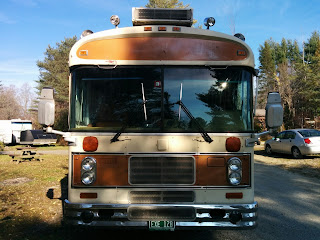
For those of you who follow Lucie, you probably know that I  gave up my apartment on May 1, 2013 and started living mobile.  We moved into a 1983 vintage Bluebird bus and started to live and work mobile full time.   The bus stayed in Vermont for 6 months then started started traveling South where I began blogging about LIVING and LEARNING MOBILE.  The blog chronicles both our traveling when the bus is moving as well as lots of blog post about Lucie's new learning.

After 6 months, the bus looped back towards Vermont to spend time enjoying Vermont weather and landscape,  play with the grandchildren, and engage in professional development with the Vermont education community.  

This month the bus is moving again, so I'm picking up the blog.  If you are interested in following along, check out our blog http://blog.livinglearningmobile.com which will be filled with stories of our living and learning mobile.  I'm crossing the first blog post from year 2 on the road below.

---------- cross posted from Living and Learning Mobile ---------------


On 11/11 at 11:00 a.m.  we hooked up the Saturn+car dolly to the bus, started her up and plugged in Savannah Georgia to the GPS which let us know we'd be there in 1111 miles.   Three days after leaving our campsite in Shelburne, Vermont,  we arrived at Skidaway Island State Park  just after dark (6:00 p.m. ) and boy was it dark.  So dark that it was impossible to tell where the campsites were, so we  are boondocking for the 3rd night in a row.


Our first night on the road we made it to New Jersey when we blew a tire on the dolly along the New Jersey Turnpike.  The good news was that the service area just a few miles down the road had an OPEN Tire Shop -- Talk about captive audience!  Wondering if that cement construction barricade that caught our tire was strategically placed?  Even though the service area was slated for 2 hour parking, there were plenty of truckers spending the night and the mechanic who hooked us up with not 1 (but 2) new dolly tires assured us that nobody checks and we'd be fine to stay the night.

The next night we made a planned overnight stop at a Walmart in North Carolina, and enjoyed a chance to stretch our legs as we restocked the fridge.  This morning I woke up and declared that I was moving my birthday forward one day so I could do something more exciting a little more exotic.  So for this year - my birthday will not be celebrated on November 13.


But I did do something I really liked on my birthday,  I created opportunities for teachers and students by connecting amazing people using
my very mobile office and the incredibly robust wireless network that my husband has hooked up to keep me connected  to the Internet while driving down the road.  I worked on connecting teachers and professionals interested in increasing the number of girls in tech to see if we could launch Vermont's first Girls Who Code Club;  I worked on connecting innovative educators through a project I started a few years ago (PROJECT IGNITE); I worked on connecting Google using educators through our newly launched  G+ Community of Vermont- GEG (Google Educator Group);  I connected with members of the  Maker Space of which I'm a a member of (The GENERATOR) using Google Groups; and connected with members of the ENable Google+ Community where I had a nice chat with a super smart high school senior girl  from New Brunswick who has just "3D printed an eNable hand that she plans on automating by using Servo motors and a programmed Arduino chip and a 5 button panel to individually control which finger is bent and to what degree it is bent"; and much more.   For those of you who read the signature line on my emails, you aren't surprised that this is how I like spending my days.  And for those of you who are wondering... this is the quote at the bottom of each of my emails.
--------------------------------------
Nothing is really work unless you would rather be doing something else.
- James M. Barrie
---------------------------------------
So on the first three days of our Year 2 journey, while Craig burned through about $393 worth of diesel during our 1111 miles, I burned through 4898 mb of data.  The good news is that we have purchased 70 gigs of data between (AT & T and Verizon's double your data October deal).   With Craig keeping his Verizon plan and my keeping my AT&T plan we hope to be able to connect to most places we travel. (Although I was not smiling when I first drove into  this dark forest to see no bars on my phones - which means no birthday calls --good thing I moved my birthday to tomorrow ;)


Tomorrow we'll walk around the camp ground and pick out a site to spend the next 6 days based on many factors (from cell signal to flat enough to keep our 35 Bluebird Wanderlodge level).  Craig will catch up on the service tickets that have backlogged while he's been busy driving and get his school in good shape for the upcoming end of the trimester learning showcases.  I'll post next week's modules in my two online classes and provide feedback on final projects.  And then my guess is we'll go find a nice place in Savannah for a belated birthday dinner.

Stay tune for this year's journey out of Vermont as Craig and Lucie continue to Live and Learn and Mobile as today's  technology provides us the opportunity to work from anywhere.  Hope its as safe and enjoyable a journey as last year.

November 2103 - May 2014 in our 1983 BlueBird Wanderlodge
May - 2014 - November 2014 we enjoyed Vermont from our Travel Trailer at Mallet's Bay Campground. 


Monday, November 03, 2014

Our Vermont students are Making a BIG Difference with their 3D printer

Last week I was so honored to be invited to visit the STEM Academy at Essex High School to see one of the project inspired from the CREATE MAKE LEARN Summer Institute in full swing. As an ambassador for Creativity and Innovation in our school, I just had to write this piece for the eNable newsletter and post for the Create Make Learn blog. Create Make Learn Summer Institute was the third large scale professional development project I designed with the goal of inspiring creativity and innovation in our schools. When I see this type of authentic learning emerge, I become so inspired and leave re-energized to look for more ways to bring opportunities to teachers and students. 
------- cross post from Create Make Learn blog ------


“It seems so little but its making such a big difference”  described a STEM Academy student as he snapped together components of each finger printed from ABS filament off the uPrint 3D printer located in Room D-104 of Essex High School. He described that the 3D printed hand his team was assembling was going to help a 17 year old boy from Washington state.  

When I walked into the room, minutes before class was about to start, I noticed 4  lunch trays, some pliers, a hammer, and a few other tools  strategically placed on round circular tables. Each lunch tray contained 32 ABS parts that had been printed over the previous  few weeks.  “This one part took 22 hours to print” explained STEM Academy leader,  Lea Ann Smith,  as she held up the largest piece in the collection.  

Lea Ann Smith and Doug Horne,  dedicated teachers who have put in countless hours to make sure that the each part was  successfully printed and ready for the weekly advisory meeting time of the STEM Academy students greeted their 17 students with a look of anticipation as they walked through the door.


Although their teachers,  Mr. Horne  and Mrs. Smith,  were also learning the process outlined by the eNable community for assembling the hands, their years of experience brought many skills to the process, ranging from an understanding of technical 3D modeling software like Rhino to classroom management in a  project based learning environment. Mrs. Smith learned about the eNable community while attending the CREATE MAKE LEARN Summer Institute last summer and saw this as the perfect authentic project for her STEM academy students. Together with her co-teacher, Mr. Horne, they skillfully administered just the right amount of direction and scaffolding to guide the students successfully to the next step of the process -  not an easy tasks for a class that meets once a week for 30 minutes.

Just last week the students had used RHINO to scale the pieces and prepare them for the printer. One STL file had to be scaled to fit a 3 year old child, the other a 17 year old boy, and the last two were going to help a 58 year man who had lost fingers on both hands. The students were matched with their recipients by a community of volunteers collaborating to match those in need of fingers with 3D printer enthusiast called eNable. (Learn more about them at Enabling the Future)

Mr. Horne created a smooth transition from last week’s class by gathering the students quickly into their seats  facing a wall sized slideshow of the printed parts.  

With only 30 minutes of classroom time per week,  the students knew they had little time to waste if they were to stay on schedule with their plan to eNable each of the hand donors with a newly assembled 3D printed hand.  The students took a few minutes to review the instructional video from eNable volunteer, Jeremy Simon, demonstrating how to work with the snap screws and individual components of the hand.   

After  reviewing some key components of the video,  the students grabbed a set of clearly printed directions, and quickly grouped around the lunch trays and
went right to work moving their 3D hand assembly to the next level.   Meanwhile  Mr. Horne and Mrs. Smith answered questions and  encouraged each group to write a short paragraph providing the donor with an update of the progress of their eagerly anticipated hand.  


The 17 students taking part in these 4 eNable hand assemblies  are part of the Medical Advisory portion of the STEM Academy  at Essex High School in Essex, Vermont.  The STEM Academy  currently consists of 50 students and seven faculty members.  The purpose of the Academy is to give students an opportunity to experience STEM disciplines in a deeper and more meaningful way than is typically available in the classroom.  The major elements of the program are enrollment in the weekly STEM Advisory, attending STEM Lecture Series events, participating in an internship and creating an independent project.  Students in the STEM Academy will be exposed to a wide variety of new ideas and hands on projects.  They will meet people who share their interests, both in their high school peer group and in the community, and they will learn how work collaboratively and creatively with these people to solve interesting and relevant problems.

Communication,  collaboration,  close reads, technical skills, career education,  along with a feeling of contribution to quality of human life were all part of this powerful carefully designed instructional experience that aims to make a BIG difference from such a small but precious time slot in the week of these Vermont students. Follow them on Twitter @EssexSTEM